
Green or Cyan? RYB vs RGB Color Wheels Explained
Red's complement is green on a painter's wheel and cyan on a screen. See how RYB and RGB color wheels differ and which one to use for paint, print, or web.
Colors in this guide
Ask a painter for the opposite of red and the answer is green. Type pure red, #FF0000, into a digital color wheel and it returns cyan, #00FFFF. The same split shows up with blue: painters pair it with orange, while most design software pairs it with yellow.
Neither answer is a mistake. They come from two different color wheels: the traditional red-yellow-blue (RYB) wheel used in painting, and the red-green-blue (RGB) wheel that describes light and drives every screen.
The difference matters when you take advice built on one wheel and apply it with a tool built on the other, and right now plenty of people are looking for partner colors. The 2027 forecasts lean green and blue, with Dulux choosing Soulful Sage and WGSN and Coloro naming Luminous Blue their Colour of the Year 2027. This guide explains how the two wheels are built, where their complements disagree, and which one fits paint, print, styling, and screen work.
The short answer
The RYB color wheel uses red, yellow, and blue as its primaries and comes from traditional painting. The RGB color wheel uses red, green, and blue, the primaries of light, and it is the wheel behind screens, HSL values, and digital color pickers. Because the two wheels space their hues differently, complements change: red pairs with green on RYB but with cyan on RGB. Use RGB for anything shown on a screen.
What is the RYB color wheel?
The RYB wheel is the one most people meet in art class. Red, yellow, and blue are the primaries. Mixing them in pairs gives the secondaries orange, green, and violet, and mixing neighbors again gives six tertiaries, for twelve hues in all.
The model is old. Moses Harris’s 18th-century treatise The Natural System of Colours built its wheel around red, yellow, and blue, and painters have organized pigments that way ever since. The RYB wheel is a practical convention for mixing paint, not a measurement of light. Like any set of three paints, red, yellow, and blue cannot mix every color, and modern process printing is built on a different trio altogether.
What is the RGB color wheel?
The RGB wheel describes light. Red, green, and blue are the additive primaries, and equal amounts of all three make white. Mixing them in pairs gives the secondaries: red and green make yellow, green and blue make cyan, and blue and red make magenta.
Every screen builds its colors this way, and the HSL format turns the RGB wheel into angles. In the CSS Color specification, 0° is primary red, 120° is primary green, and 240° is primary blue, which puts yellow, cyan, and magenta halfway between at 60°, 180°, and 300°. The hue number a color picker shows you is a position on this wheel. The guide to HEX, RGB, and HSL explains how those formats describe the same color.
Printing inks use the same wheel from the other side. The subtractive primaries are cyan, magenta, and yellow, which are the RGB secondaries, so a CMY color wheel has the same opposites as an RGB one.
Why the two wheels disagree
Both wheels are circles of hues. They space those hues differently.
On the RGB wheel, measured in HSL degrees, red sits at 0°, yellow at 60°, and blue at 240°. The stretch from red to yellow covers only 60°, while the stretch from yellow through green and cyan to blue covers 180°. The RYB wheel gives red, yellow, and blue equal thirds of the circle, 120° each, which stretches the reds, oranges, and yellows and squeezes the greens and blues.
Change the spacing and you change what sits opposite. On the RGB wheel, the hue 180° away from red is cyan. On the RYB wheel, green has been pushed around the circle to make room for the oranges, so green ends up opposite red.
The two wheels also mean different things by “complement.” On the RGB wheel, complementary lights add up to white: cyan light is green and blue together, so red plus cyan contains all three primaries. On the RYB wheel, complements are the traditional painter’s pairs, colors that look strongest side by side and dull each other toward a neutral when mixed.
Complementary colors on each wheel
The six main hues show where the wheels agree and where they part ways.
| Starting color | Painter’s (RYB) complement | Screen (RGB) complement | Agree? |
|---|---|---|---|
Red #FF0000 |
Green | Cyan #00FFFF |
No |
Orange #FF8000 |
Blue | Azure #007FFF |
Roughly |
Yellow #FFFF00 |
Violet | Blue #0000FF |
No |
Green #00FF00 |
Red | Magenta #FF00FF |
Partly |
Blue #0000FF |
Orange | Yellow #FFFF00 |
No |
Violet #8000FF |
Yellow | Chartreuse #80FF00 |
Partly |
The painter’s column uses names because RYB has no single standard formula for converting to screen values. The twelve-hue wheel defines its opposites by name instead:
- yellow and violet;
- yellow-orange and blue-violet;
- orange and blue;
- red-orange and blue-green;
- red and green;
- red-violet and yellow-green.
Notice the asymmetry with blue. Orange’s opposite is a blue on both wheels, but blue’s opposite is orange on RYB and yellow on RGB. The cause is the spacing again: the RGB wheel puts blue at 240°, exactly 180° from yellow, while the RYB wheel puts it opposite orange.
Which color wheel should you use?
Match the wheel to the medium the color will end up in.
- Websites, apps, and digital design: RGB. Screen colors are light, CSS hue angles follow the RGB wheel, and contrast checks run on RGB values. A complement is the hue plus 180°.
- Print design: RGB while designing, CMYK for output. The CMY wheel shares the RGB wheel’s opposites, so complements carry over. The color formats guide explains why a converted CMYK value is a starting reference rather than a print guarantee.
- Mixing paint and art lessons: RYB. It is the vocabulary of art education and pigment mixing, even though real pigments do not follow any wheel perfectly.
- Fashion and interiors: either, as long as you know which one you are using. Much traditional styling advice is written around RYB pairs such as red and green or blue and orange. If you apply that advice with a digital color picker, use the RYB pair names rather than adding 180° to the hue.
How to find a complement from a HEX code
On the RGB wheel
- Convert the HEX code to HSL.
- Add 180 to the hue. If the result is over 360, subtract 360.
- Keep the saturation and lightness the same.
A warm tan, #C79C71, is HSL(30, 43%, 61%). Its RGB complement is HSL(210, 43%, 61%), a soft sky blue, #719CC6.
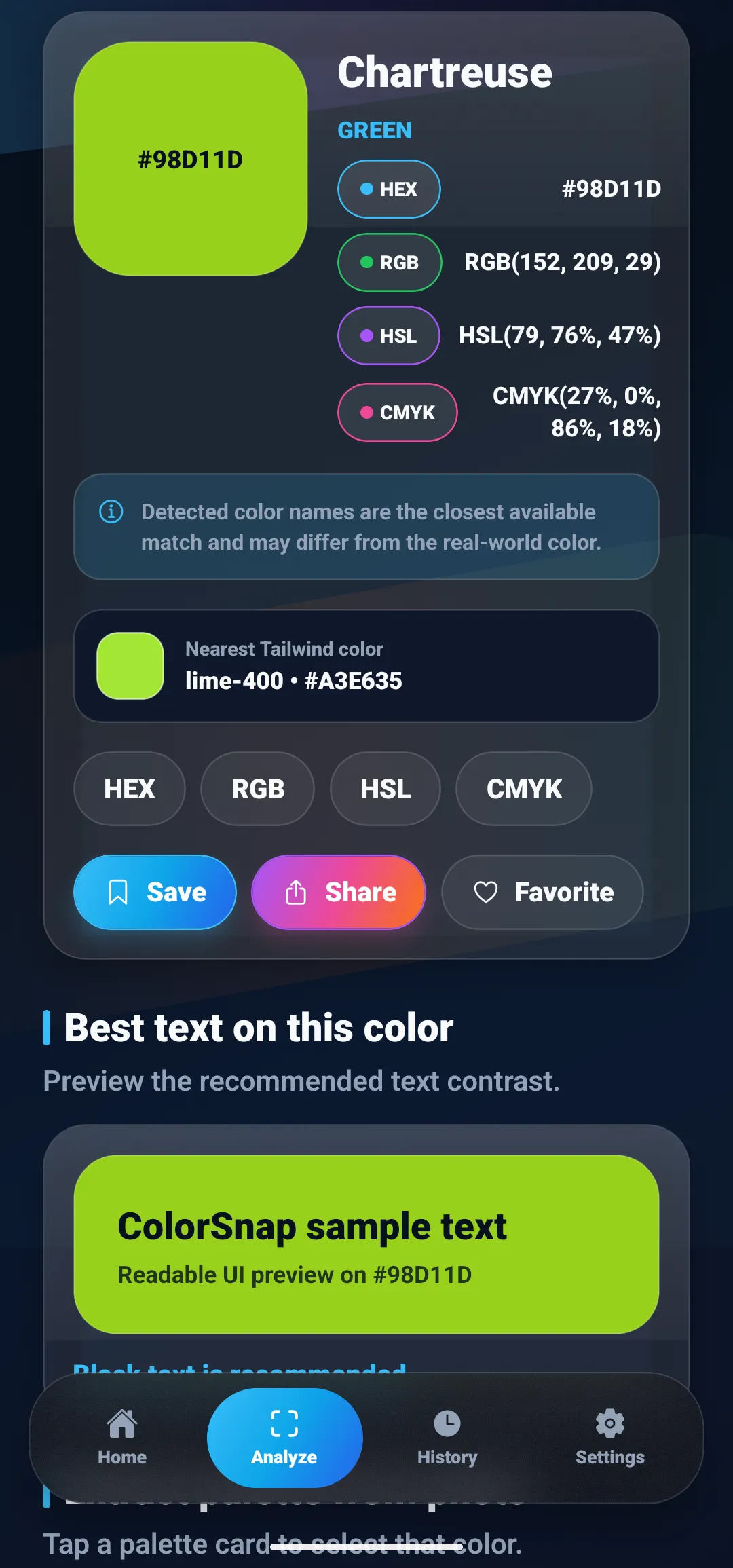
Every color reading in ColorSnap shows the HSL value beside HEX and RGB, so the hue you need for step 1 is already on the result card. A reading of Chartreuse, #98D11D, shows HSL(79, 76%, 47%). Its RGB complement sits at 259°, a vivid violet, #561DD3. On the painter’s wheel, the same yellow-green pairs with red-violet instead.
You will often see a shortcut: subtract each RGB channel from 255. That inverts the color, which rotates the hue by 180° but also flips the lightness. Inverting #C79C71 gives #38638E, a much darker blue than the complement #719CC6. The two methods only agree for colors at 50% lightness, such as pure red and cyan.
On the RYB wheel
There is no standard conversion, so work by name:
- Read the HSL hue to find the color family. Roughly, 0° is red, 30° orange, 60° yellow, 120° green, 210° to 240° blue, and 270° violet.
- Find the opposite family in the RYB pairs above.
- Choose a version of that color with similar saturation and lightness, then judge it by eye.
Sage shows how far apart the two answers can land. A common sage value, #9CAF88, is HSL(89, 20%, 61%), a muted yellow-green. The guide to shades of green explains why sage values vary.
- On the RGB wheel, sage’s complement is HSL(269, 20%, 61%), a soft lavender,
#9B88AF. - On the RYB wheel, yellow-green pairs with red-violet, which points toward a dusty mauve. One screen value in that direction is
#AF88A2, HSL(320, 20%, 61%).
Both pairings are legitimate. The lavender is the hue directly opposite on screen, and the mauve is the traditional painter’s pairing. Pick the effect you want, then test the pair in the real design.
How ColorSnap’s palette generator handles complements
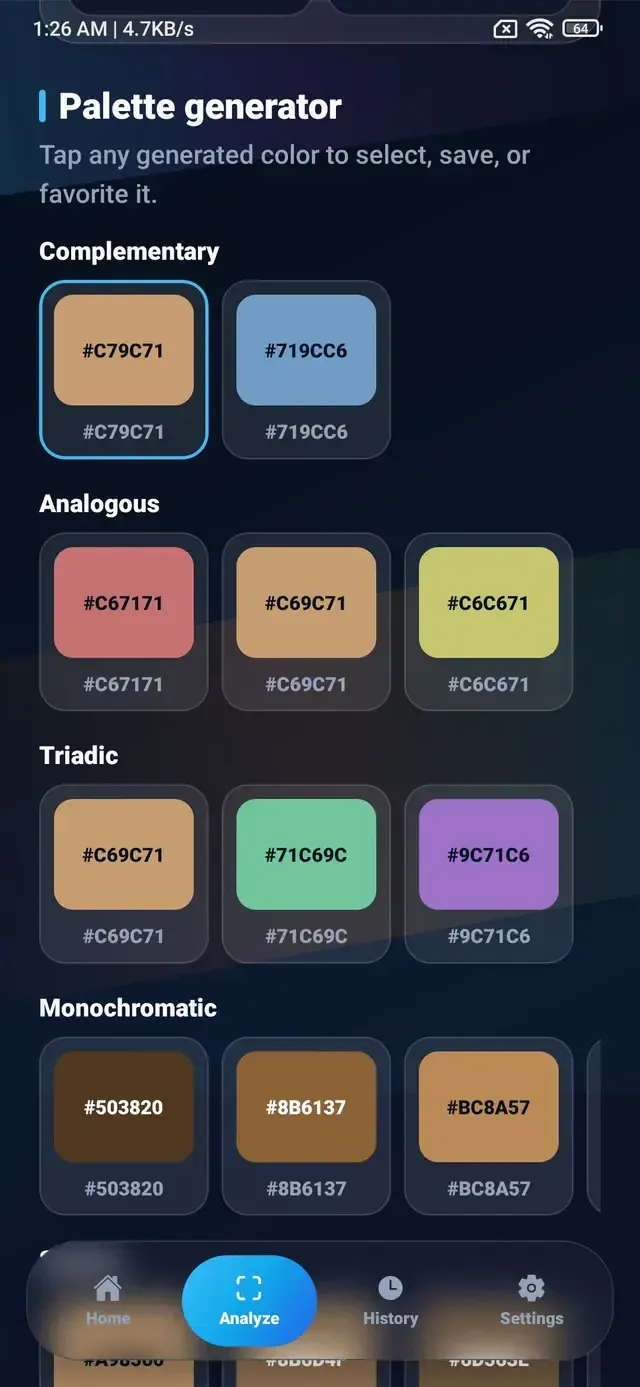
ColorSnap’s palette generator works on the RGB wheel. For the selected color, it keeps saturation and lightness and rotates the hue: 180° for the complementary pair, 30° either side for analogous colors, and 120° and 240° for a triad. It also builds monochromatic, shade, and tint rows from the same color.
The screenshot at the top of this guide shows the generator’s output for the warm tan #C79C71. The complementary pair is the sky blue #719CC6, and the triad adds #71C69C and #9C71C6. This is one of the cases where the two wheels roughly agree, because tan is a light, muted orange and orange’s painter’s complement is also blue.
Give the generator pure red and it returns cyan, because that is the RGB answer. If you are following painter’s advice instead, use the generator for the screen-based options and type the RYB partner into Manual HEX input to see its values. Any generated color can be tapped to select, save, or favorite it.
Common mistakes with complementary colors
- Mixing wheels. Following painter’s advice such as blue with orange, then checking it on a digital wheel that says blue with yellow, produces conflicting answers. Decide which wheel you are using first.
- Treating invert as complement. Subtracting from 255 flips lightness as well as hue. Use the HSL method when you want the same lightness.
- Using a complement as a text color. Opposite hues do not guarantee readable text.
#C79C71with its complement#719CC6has a contrast ratio of only 1.16:1, and red on cyan reaches 3.19:1. Both fall short of the 4.5:1 minimum for ordinary text. The color contrast checker guide explains how to test a pair. - Using both colors at full strength. Two saturated complements of equal size often look harsh side by side. Let one color lead and use the other as an accent.
Pick the wheel, then the partner
Red’s complement is green on a painter’s wheel and cyan on a screen, and each answer is right within its own system. Use the RGB wheel, with the HSL hue plus 180°, for anything that ends up on a display. Use the RYB pairs when you are mixing paint or following traditional styling advice. Then test the pair where it will be used, including its contrast.
ColorSnap’s palette generator shows complementary, analogous, and triadic options for any color you sample, and the guide to building a palette from one color shows how to turn a pair into a full scheme.
Questions
Frequently asked questions
What is the complementary color of red?
It depends on the color wheel. On the traditional red-yellow-blue (RYB) wheel used in painting, red's complement is green. On the red-green-blue (RGB) wheel used by screens and HSL color pickers, red's complement is cyan, #00FFFF, which is red's hue rotated 180 degrees.
Are the primary colors red, yellow, and blue or red, green, and blue?
Both sets are in use. Red, yellow, and blue are the traditional painter's primaries. Red, green, and blue are the additive primaries of light, which screens use. Printing uses a third set, cyan, magenta, and yellow, as its subtractive primaries.
Which color wheel should I use for web and app design?
Use the RGB wheel. Screen colors are made of red, green, and blue light, and CSS HSL hue angles follow the RGB wheel, so a complementary color is the hue plus 180 degrees. Painter's pairings such as blue and orange are still useful as a style reference, but they are not RGB complements.
Is the RYB color wheel wrong?
Not wrong, but it is a traditional convention rather than a physical model. It describes how painters have long organized pigments, and it remains useful in paint and art education. It does not describe how light mixes, and modern process printing uses cyan, magenta, and yellow rather than red, yellow, and blue.
How do I find the complementary color of a HEX code?
Convert the HEX code to HSL, add 180 to the hue, and keep the saturation and lightness. If the new hue is over 360, subtract 360. #C79C71 is HSL(30, 43%, 61%), so its complement is HSL(210, 43%, 61%), which is #719CC6.
Why do digital color wheels pair blue with yellow instead of orange?
On the RGB wheel, pure blue sits at 240 degrees and pure yellow at 60 degrees, exactly opposite each other. The painter's RYB wheel spaces red, yellow, and blue evenly instead, which moves blue's opposite to orange. Each pairing is correct within its own wheel.
Explore ColorSnap color tools
Start from the ColorSnap homepage or review the complete app features. For focused workflows, learn about the color identifier for Android and iOS, use the photo color picker, or explore the image palette generator. The ColorSnap FAQ answers common questions about formats, images, saved colors, and app usage.